Toggle Nav

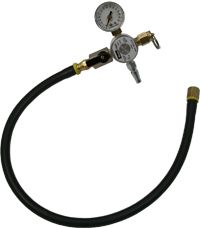

PRESSURE MODULE
$188.97
Used with the KL5007NAV Coolant Management System
Availability: In Stock - Ships in 1 Business Day
SKU
KL5006NAV
The KL5006NAV Pressure Module uses standard shop air to create regulated pressure that forces the coolant out of the entire system into the 20 gallon tank. After the coolant is out, closing a single valve allows for a pressure test to be performed, diagnosing the integrity of the system. Once this has been completed any necessary repairs can be made before proceeding the the Vacuum Procedure.
PROCEDURE:
- With Tank Valve turned to CLOSED, open Air Valve on Pressure Module until gauge stabilizes.
- Close Air Valve and take note of the gauge reading and check for pressure decay. If no decay is detected, continue the procedure. If decay is evident, locate and repair the leak.
- Turn the Tank Valve to DRAIN to vent air. Disconnect shop air and remove Pressure Module.
| SKU | KL5006NAV |
|---|---|
| Service Bulletin | none |